Your AI agent writes the test once. Optics runs it with no model.
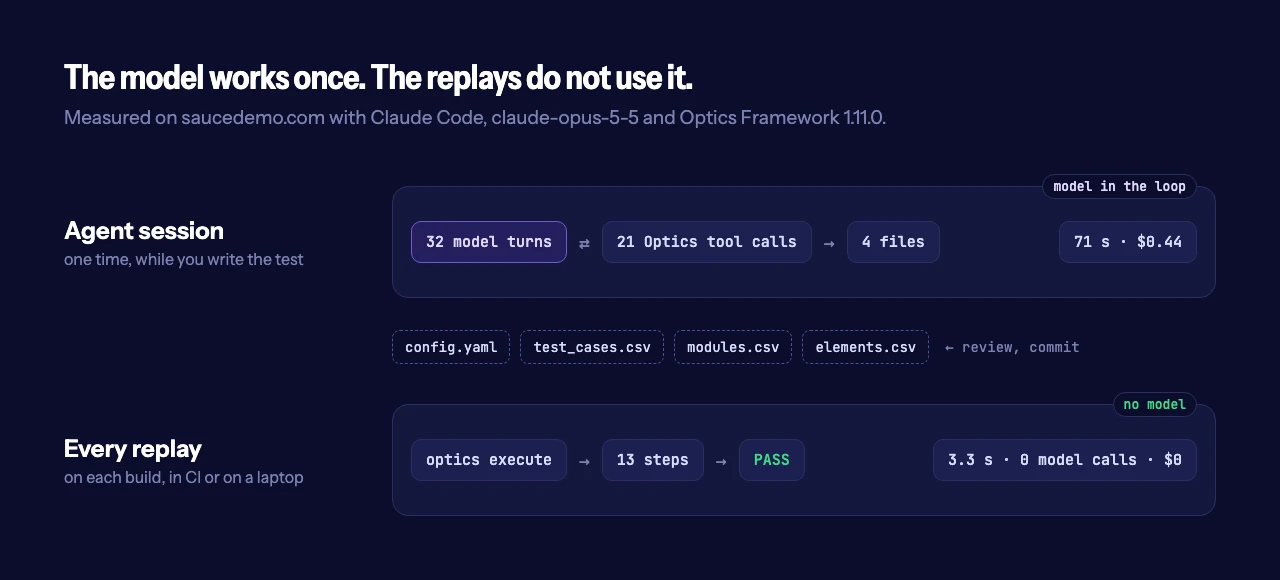
An AI agent drives a real browser through the Optics MCP server and writes a CSV test suite. Later runs replay that suite with no model, in about 3 seconds.

Many AI tools for UI tests put a model in control of each test run. Thus, each run has a model cost. Also, the model can go through the app in a different sequence each time.
Optics Framework uses the model at a different point. Your AI agent goes through the app one time through the Optics MCP server. Then it writes a CSV test suite. After that, each run replays the suite and uses no model.
I did this procedure on saucedemo.com, a sample web site for tests. The agent was Claude Code with claude-opus-5-5, and the server was Optics Framework 1.11.0. This post shows the recorded session, the files that the agent wrote and the data from 10 replays.
The recorded agent session at 1.5× speed. The left panel shows each Optics tool call, and the right panel shows the browser that the agent controls.
The prompt#
I gave Claude Code one prompt and one MCP server. Skills and user settings were off. Thus, the agent had only the information from Optics.
Use the optics tools to open https://www.saucedemo.com in Playwright with headless false.
Sign in as standard_user / secret_sauce, add the Sauce Labs Backpack to the cart,
open the cart, check out as Ava Birch with postcode 560001, finish the order,
and check that "Thank you for your order!" appears.
Then write it as an Optics suite in ./checkout, run optics dry_run on it,
and tell me how to run it.
What the MCP server gives the agent#
optics mcp is a Model Context Protocol server. In version 1.11.0 it has 41 tools. 3 tools control the session, and 38 tools are Optics keywords such as press_element, enter_text and assert_presence. The agent can also read these MCP resources:
optics://session/{id}/elements: a short list of the elements on the screen. Each item has a label, the permitted actions and the position on the screen.optics://session/{id}/screenshotandoptics://session/{id}/source: the screen as an image, and the full UI tree.optics://project-format: the rules for the suite files.optics://keywords: the full list of keywords.
On a web page, an item in the element list can also have a loc value. Optics makes this CSS selector in the browser. Then Optics makes sure that the selector finds only that element. This is the item for the Login button on saucedemo.com:
{"i": 3, "label": "Login", "cls": "input", "bounds": [494, 302, 786, 351], "act": ["tap"], "rid": "login-button", "loc": "[data-test=\"login-button\"]"}The agent used a loc value for each of its 11 clicks and text entries.
The server has no tool to record or save a test. The agent writes the files, and it uses the rules from optics://project-format. The server also does not show the tools that tap a screen coordinate. On a different screen size, a coordinate from a screenshot can point to a different element.
The session#
The time for the session was 71 seconds, with 32 model turns. The agent made 21 Optics tool calls and read the project format one time. It read the element list 6 times, one time on each new page. Claude Code showed a model cost of $0.44.
First, the agent did the full checkout in the browser. It found "Thank you for your order!" on the last page. Then it wrote 4 files and ran optics dry_run. The dry run passed.
The files#
The test case uses 5 modules in sequence. The modules file has one row for each action, and all the values are variables:
module_name,module_step,param_1,param_2
Open Site,Launch App,${site_url}
Login,Enter Text,${username_field},${username}
Login,Enter Text,${password_field},${password}
Login,Press Element,${login_button}
Add Backpack To Cart,Press Element,${add_backpack_button}
Add Backpack To Cart,Press Element,${cart_link}
Add Backpack To Cart,Press Element,${checkout_button}
Enter Checkout Details,Enter Text,${first_name_field},${first_name}
Enter Checkout Details,Enter Text,${last_name_field},${last_name}
Enter Checkout Details,Enter Text,${postal_code_field},${postal_code}
Enter Checkout Details,Press Element,${continue_button}
Finish Order,Press Element,${finish_button}
Finish Order,Assert Presence,${order_complete_header}
The elements file holds the test data and the locators. For most elements, the agent put the verified loc value first and the label second:
Element_Name,Element_ID,Element_ID_2
site_url,https://www.saucedemo.com,
username,standard_user,
first_name,Ava,
username_field,"[data-test=""username""]",Username
login_button,"[data-test=""login-button""]",Login
checkout_button,"[data-test=""checkout""]",Checkout
finish_button,"[data-test=""finish""]",Finish
order_complete_header,text=Thank you for your order!,"[data-test=""complete-header""]"
For a different user or a different product, write new values in this file. The modules stay the same.
These 4 files are the full result of the session. You can read them, review them in a pull request and keep them in Git with the code of your app.
The replay#
Then I ran the suite 10 times with optics execute. The environment had no API keys. All 10 runs passed. The shortest run was 2.8 seconds, the longest run was 4.2 seconds, and the median was 3.3 seconds. Each time includes the start of Python and the start of the browser.
3 recorded replays of the suite at 1× speed, with the terminal output of each run.
To count the model calls, I recorded each DNS lookup and each network connection from the Optics Python process. In all 10 runs, the record was empty. Only the browser connected to the network, to load saucedemo.com. To make sure that the record works, I sent one request to example.com from the same process. The record showed that request.
The source code agrees with this result. Optics makes an LLM client only when you set ai_self_heal to true. The value is false if you do not set it.
Data from the agent session and from the 10 replays.
| Agent session | Each replay | |
|---|---|---|
| Time | 71 s | 3.3 s (median of 10) |
| Model turns | 32 | 0 |
| Model cost | $0.44 | $0 |
| Result | 4 suite files | 10 of 10 runs passed |
When the page changes#
A suite from an agent has the same problem as a suite from a person: the app can change. To simulate a refactor, I replaced the login button locator in elements.csv with [data-test="login-btn-v2"]. That selector is not on the page.
The run passed. Optics did not find the first locator. Then it tried the second locator, the label "Login". The log shows each locator that Optics tried:
Locating element: [data-test="login-btn-v2"] of type: CSS...
Locating element: Login of type: Text...
Pressing element 'Login'
The time for this step was 10.2 seconds. With a correct first locator, the time for the same step is approximately 0.1 seconds. Optics waits for the first locator until its time limit, and then it tries the label. The run passes with the second locator, but the run is slower. When the log shows a fallback, update the first locator.
Do it yourself#
Python 3.12 (minimum) and an MCP client are necessary. These steps use Claude Code.
- Install Optics Framework with the MCP server:
pip install "optics-framework[mcp]". - Install the browser engine:
optics setup --install playwright. - Add the server to Claude Code:
claude mcp add optics -- optics mcp. - Give the agent a prompt with the same parts as the prompt above: the URL, the steps, the last check and the folder for the suite.
- Read the files that the agent writes. Examine them as you examine a pull request.
- Run the suite:
optics execute checkout.
For Cursor, VS Code and Claude Desktop, refer to Let your AI agent build tests. For CI, set headless: true in config.yaml and refer to Run tests in CI.
Limits#
- The quality of the suite is a function of the model and the prompt. Read the files before you commit them.
optics dry_runexamines the files only. It does not open the app. Runoptics executeone time before you use a new suite in CI.locvalues are available on web pages only. On Android and iOS, the agent uses the ids and labels from the element list.- Loops, conditions and data files are not MCP tools, because they operate only in a full suite run. The agent can write them into the modules.
- The HTTP transport (
optics mcp --transport http) has no authentication. Keep it on 127.0.0.1 or on a network that you control.
For an introduction to Optics Framework, read Introducing Optics Framework. To find error screens that no step examines, read Your tests passed. Your app didn't.
- Docs: Let your AI agent build tests and the MCP server reference
- Source: github.com/mozarkai/optics-framework